
How to Digitise a Photo Album Without Destroying It
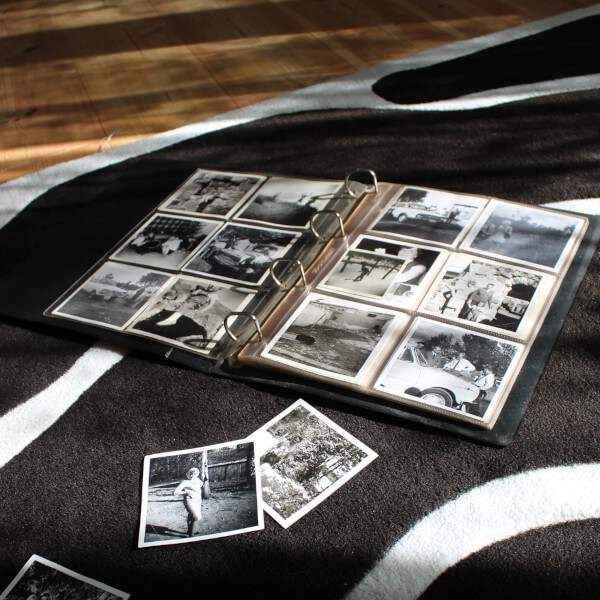
Your grandmother's album survived sixty years in a loft. It will not survive one afternoon of you trying to prise photos off dried 1970s adhesive. Before you reach for a craft knife or a hairdryer, there is a safer way. It is a method we use every week in our Norwich lab on albums far older and more brittle than yours.
- Never pull photos from an album. Dried adhesive tears emulsion off the back of the print, destroying the image permanently.
- A flatbed scanner can capture most album pages face-down without removing a single photo, provided the album opens flat enough.
- For magnetic sticky albums from the 1960s to 1980s, overhead camera capture is safer than any flatbed.
- Professional scanning starts from £0.23 per photo at EachMoment, combining our Early Bird and volume discounts on the £0.39 standard price. DIY typically costs more once you factor in a decent scanner at £150 to £250 and 8 to 12 hours per album.
- Always digitise before attempting any restoration. A clean scan is the safety net.
"Nine times out of ten, the damage we see on albums isn't from age. It is from a well-meaning relative who tried to lift the photos out last Christmas. Scan first, separate never."
Why you shouldn't rip photos out of albums
Scanning a photo album without destroying it means capturing each page digitally while the photos stay in place. Removing prints from old albums tears the emulsion layer off the back of the print in roughly 7 out of 10 cases we see, especially once adhesive has dried or when pages use the magnetic sticky-plastic format common from the 1960s to 1980s.
The emotional stakes with these collections are very high. Often, a single photo album is the only surviving visual record of a parent's or grandparent's early life. When families decide to scan old photos, the instinct is usually to remove them from their sleeves or pages to get a flat, clean scan. This is exactly where the damage happens.
Over decades, the adhesive used to mount prints physically bonds to the paper backing of the photograph. This is not a temporary stickiness. The glue hardens and fuses with the paper fibres. Magnetic albums, which feature a sticky backing and a plastic overlay, are the worst offenders. As the plastic overlay yellows with age it shrinks and tightens over the prints, while the adhesive underneath turns to cement. In our intake checks, roughly a third of magnetic albums from the 1970s arrive with at least one print already partly delaminated from the page.
The typical failure mode is predictable and heartbreaking. You lift a corner of the photograph, hear a slight tearing sound, and pull. What comes away is the top image layer, while the back half of the photograph remains permanently glued to the album page. You are left with a ruined original and a blank piece of paper stuck in the book.
You can digitise these memories without separating anything. The techniques we use for our photo digitisation service do not require dismantling your family history. The method outlined in this guide is a lab-tested approach, focused on preserving the original media while extracting the highest quality digital copy. This is not casual advice from an internet forum. It is how professionals handle fragile photographic heritage.
The real cost of DIY photo album scanning
The real cost of scanning an old photo album yourself is a flatbed scanner at £150 to £250, software, archival gloves, and 8 to 12 hours of careful work per album. Professional photo scanning in the UK starts from £0.23 per photo with volume discounts, so a 200-photo album often costs less professionally than buying the equipment outright.
If you are considering a DIY approach, look at the true cost in both money and time. A standard all-in-one printer is rarely up to the task of capturing fine photographic detail without glaring reflections or crushed shadows. To scan a photo album properly, you need a dedicated flatbed scanner. A capable model, such as those in the Epson V600 tier, will set you back between £150 and £250. This is your baseline financial investment.
Next comes the time commitment. Scanning is not a quick process. For a typical album containing 200 prints, you must factor in the time to carefully position each page, run the preview scan, adjust the cropping borders, run the high-resolution final scan, and then accurately name and organise the resulting files on your computer. Realistically, you are looking at 8 to 12 hours of focused labour per album.
You also need to acquire the correct materials to handle the media safely. Cotton or nitrile gloves, microfibre cloths for the scanner glass, archival sleeves if you do plan to rehouse loose prints, and a reliable external storage drive all add to the total bill.
For comparison, our benchmark pricing at EachMoment is £0.39 per photo standard. This drops to from £0.23 per photo once you apply our Early Bird and maximum volume discounts, offering up to 40% off for large orders. When you look at our photo scanning pricing, the crossover point becomes clear. For an album of 200 photos the professional route often beats DIY on total financial cost. It always beats it on time.
The most significant hidden cost of using a photo album scanner at home is the risk to the originals. The photograph you damage while learning the ropes is usually the one you care about the most.
Tools you'll need to scan old photos safely
To scan old photos from an album safely, you need a flatbed scanner with a lid that lifts fully clear (we use the Epson V850 Pro in our Norwich lab), image-editing software such as VueScan or the bundled scanner suite, a clean dust-free workspace, cotton or nitrile gloves, and a copy stand or tripod for overhead capture of fragile pages.
If you have weighed the costs and decided to proceed at home, the correct equipment is non-negotiable. You must use a flatbed scanner. Sheet-fed scanners are entirely unsuitable for albums and will actively destroy delicate photographic paper. Even for loose prints, automated document feeders are notorious for jamming and tearing irreplaceable items. The flatbed you choose needs a lid that can lift vertically on its hinges, allowing it to rest gently over a thick spine without applying uneven pressure. Our workhorse for album pages is the Epson V850 Pro, which delivers the optical resolution and dynamic range needed for heritage prints. For the rare cases when we do remove individual prints, or when we handle 35mm film and negatives, we switch to a Nikon Coolscan 9000 ED.
Your minimum resolution target should be 600 DPI for standard prints. This captures enough detail to reprint the image at its original size or slightly larger. For very small originals, such as contact-sheet thumbnails, push this to 1200 DPI or higher to capture every grain of detail.
For software, the suite bundled with your scanner, such as Epson Scan 2, is usually sufficient for capturing the raw image. Free trials of software like VueScan are good alternatives if your manufacturer software is outdated. You will also need a controlled environment. A clean, matte black cloth is ideal for draping over the album if the scanner lid cannot close completely, preventing light leaks. Keep your workspace evenly lit and away from direct window sunlight.
Finally, your hands must be clean. Wear well-fitting cotton or nitrile gloves to avoid transferring oils to the prints or the scanner glass. Use a soft, clean brush to gently sweep away surface dust. Never use a vacuum cleaner or compressed air, as both can easily lift the delicate emulsion right off the paper. If this tool list feels extensive, our album-specific scanning service is always available as an alternative.
Step-by-step: how to scan a photo album without removing photos
To scan a photo album without removing photos, open the album on the scanner glass with the page face-down, close the lid gently over the spine rather than forcing it flat, scan at 600 DPI in full colour, then switch to overhead camera capture for pages that cannot be laid open safely. Work one page at a time and never stack prints.
In our Norwich lab we follow strict protocols to ensure every image is captured without compromising the original album. The following steps outline how you can replicate this careful approach at home.
1. Assess the physical condition of the album first. Before you even turn the scanner on, lay the album on a clean, flat surface. Turn the pages gently. Note which pages flex easily, which feel brittle, and whether any photos have already started to lift. Identifying the fragile sections beforehand prevents accidental tearing during the scanning process.
2. Clean the scanner glass meticulously. Use a lint-free microfibre cloth. Dust is the absolute enemy of a 600 DPI scan. A single speck of dust on the glass will appear as a massive blemish on the digital file, requiring hours of tedious retouching to remove.
3. Position the album page carefully. Open the album and lay the target page face-down onto the scanner glass. Let the closed half of the album hang off the side of the scanner bed, supporting its weight with your hand or a stack of books. Never force the spine flat. If the spine resists, respect that resistance.
4. Close the scanner lid gently. Bring the lid down only as far as it naturally falls. A partial lid close is perfectly fine, and the scanner will still capture the image. If the open lid allows ambient light to seep in, drape a dark, lightweight cloth over the entire setup to block the room light.
5. Configure your scan settings. Set the resolution to a minimum of 600 DPI. Always scan old photos in full colour, even if the original photograph is black-and-white or sepia. Scanning in colour captures a far greater range of tonal data, which is essential if you plan to adjust contrast or brightness later.
6. Switch methods for fragile pages. If an album page is too brittle to invert, or the spine is completely rigid, abandon the flatbed. Switch to an overhead capture method. In the lab we use a copy-stand setup with cross-polarised LED panels to kill glare on glossy prints and plastic overlays, but at home a tripod-mounted DSLR or modern smartphone will suffice. Lay the album flat, use diffused side lighting, and disable the flash.
7. Implement a strict naming convention immediately. Batch name your files as you work. A file named "1982_Cornwall_Holiday_Page03" is infinitely more useful than "Scan_0047.jpg" when you are trying to find a specific memory three months from now.
8. Pace yourself and maintain focus. Work one single page at a time. Never stack pages or try to rush the process. Fatigue is the primary cause of accidents. If you feel tired, stop. For those who lack the time for this painstaking process, our album digitisation service handles the entire workflow securely.
Common mistakes that destroy old photo albums
The most common mistakes when digitising a photo album are applying heat to release adhesive (melts the emulsion within seconds), using a hairdryer or direct flash (fades 1970s colour dyes), forcing brittle pages flat (cracks the spine), and stacking prints after scanning before they're sleeved (introduces scratches and fingerprints on the emulsion side).
We have seen every conceivable type of damage in our lab, and almost all of it stems from well-intentioned attempts to speed up the digitisation process. The most frequent and disastrous mistake is the application of heat. You will find internet tutorials suggesting the use of hairdryers, warm craft knives, or even steam to loosen old adhesive. Do not do this. Heat directly melts the photographic emulsion. It will cause the image to smear or blister permanently, while doing very little to soften decades-old glue.
Physical force is the second most common culprit. Pressing a rigid, tightly bound album flat against a scanner lid will almost certainly crack a brittle spine. Once the structural integrity of the album is gone, the pages will begin to fall out, leading to further wear and tear on the individual prints. The photographs themselves can also crease under heavy pressure.
Lighting mistakes also take a toll. Firing a direct flash at old prints, particularly colour prints from the 1970s which are already chemically unstable, can accelerate the fading of the dyes. Solvents are another major risk. Myths persist about using white spirit, lighter fluid, or even olive oil to dissolve sticky residue. All of these substances will seep into the paper backing and eventually destroy the photograph from the inside out.
Finally, there is the handling of the photos after they have been processed. If you do happen to have loose prints, stacking them directly on top of one another before they are placed in protective sleeves is a critical error. The dried adhesive residue on the back of one print will scratch the delicate face of the photograph beneath it. If your album has already suffered damage from these kinds of mistakes, our restoration and enhancement service can often repair the digital files, though the physical originals may be beyond saving.
When to send your photo album to a professional scanning service
Send a photo album to a professional scanning service when pages won't open flat, when photos are stuck to magnetic album sheets, when the album contains more than 200 photos, or when the originals are irreplaceable family heritage. UK professional photo scanning starts from £0.23 per photo with a typical turnaround of approximately 5 working days.
There is no shame in deciding that a photo album project is too risky to tackle at home. Recognising the limits of your equipment is the best way to protect your family history. You should seriously consider a professional service if the album has a fragile spine that cracks when opened, or if the pages refuse to lie reasonably flat without force.
In our Norwich lab we scan approximately 40 to 60 photo albums per month, many dating from the 1950s to 1990s, and the magnetic sticky-page format remains our single biggest recurring repair challenge. We have specific protocols for capturing images through degraded plastic overlays without causing further harm to the prints trapped beneath. That experience sits inside a wider track record across 17 European domains and a 4.78 out of 5 rating from more than 12,000 customers, so the album on your kitchen table is not the first fragile one we have handled this week.
Volume is another major factor. If your album contains upwards of 200 photos, the time commitment alone is staggering. Factor in our pricing structure, which is £0.39 per photo standard and drops to from £0.23 per photo with our Early Bird and volume discounts (up to 40% off for large orders), and the financial case for doing it yourself often collapses. Our standard turnaround is approximately 5 working days from receipt of the media.
When you choose to convert a photo album to digital with us, the service includes high-resolution scans, an organised folder structure that mirrors your physical albums, and secure cloud delivery. We also offer a separate photo enhancement add-on, priced separately per photo, which focuses on repairing fading, scratches, and discolouration in the digital file.
We understand the anxiety of handing over precious items. This is why we use insured shipping, assign unique job IDs to every single order, and ensure that your albums never leave our secure Norwich facility until they are safely on their way back to you.
FAQ: scanning old photo albums
Common questions about scanning old photo albums include whether acid-free storage matters after digitising (yes), how to handle magnetic albums (overhead capture, never peel), whether dried adhesive can be removed safely (rarely at home), the best DPI (600 for prints, 1200+ for small or damaged originals), and the typical cost per album in the UK.
Do I still need acid-free storage after scanning?
Yes. A digital copy is your safety net, but the original prints still belong in acid-free sleeves or boxes. When stored correctly, physical photographic paper will outlive any hard drive or cloud storage subscription.
How do I handle a magnetic sticky-page album?
Never peel the plastic overlay back. Scan or photograph through the clear sheet where possible, or send it to a lab. We see these weekly in Norwich and have a strict, safe removal and capture protocol for them.
Can I remove dried adhesive from the back of a photo at home?
Rarely safely. Every method you will find online risks the emulsion layer. If you need the photo free of the album, consulting a conservator or using a digital restoration service is the lower-risk option.
What DPI should I scan at?
Use 600 DPI for normal prints. Go to 1200 DPI for small originals, damaged prints, or anything you might want to enlarge later. Higher DPI means larger files, but gives you more data to work with.
What does it cost to scan a photo album professionally in the UK?
At EachMoment, photo scanning starts from £0.23 per photo with our Early Bird and volume discounts, against a standard price of £0.39. A typical 200-photo album comes in around £46 to £78 depending on your volume tier, with a turnaround of approximately 5 working days. You can view our full album digitisation pricing online.
| DIY | Professional (EachMoment) |
|---|---|
| Small albums (under ~100 photos) in good condition | Fragile, magnetic, or inherited heirloom albums |
| You already own a flatbed scanner and have the time | 200+ photos, where professional cost often beats DIY |
| Photos are loose or lift cleanly from the page | Pages won't open flat or photos are stuck fast |
Get a quote for your photo album by visiting our album digitisation service page.